PHOTO BACKGROUND REMOVER
Transparent Background Maker With No Credit Meter
Photo Background mode separates the subject from the backdrop with our AI model on GPU servers, with no account and no credit meter.
- ✓ Try without signup
- ✓ No watermark
- ✓ GPU-powered
Drop a video, or choose a file
Your file is uploaded securely to our servers for processing.
Choose a file MP4, WebM or MOV · up to 5 minutes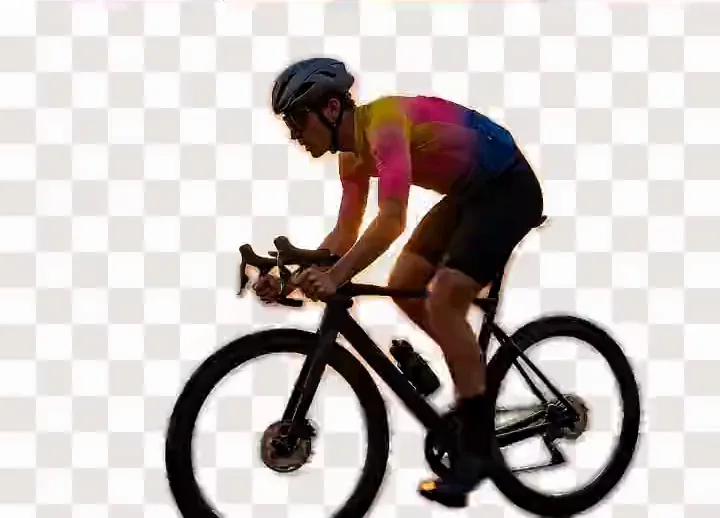



Drag to compare: the original on the left, the background removed on the right, shown against a transparency checkerboard.
Background
60min
remove.bg keeps your upload
1.7of 5
Pixelcut on Trustpilot
42.2M
remove.bg visits a month
PNG
Out, with real alpha
No signup
To try it
A Transparent Background Maker Separates a Subject From Its Backdrop
A transparent background maker identifies the subject in a photo and discards everything behind it. The mechanism is image segmentation: a model classifies each pixel as subject or background and writes a mask. The exported PNG stores it as an alpha channel, so the cutout drops onto any colour.
Photo Background mode uploads your photo and runs that segmentation with our AI model on GPU servers, usually in a few seconds. The same servers drive the video background remover — quick on people, softer on hair than a chroma key.
What Happens to Your Photo, Tool by Tool
We read the five pages holding the front page: remove.bg, Photoroom, Pixelcut, Clipdrop, Erase.bg. All of them process your image on their servers, as we do; what differs is what you get back and what they say about keeping it.
Credit-metered removers
- Upload it to their server
- A full-size preview
- A 500 × 500 download
- The file behind a credit
- remove.bg discards it after 60 minutes, beside a training opt-in
bgremover.ai
- Pick a photo — uploaded securely to our servers
- Processed on our GPU servers
- No credit meter, data not stored
- Save a PNG with a real alpha channel
Our privacy policy states what we keep and for how long.
What the Free Tiers Actually Say
From each tool's own page, 1 September 2026.
| Tool | Free download | Stated limits | Your image |
|---|---|---|---|
| bgremover.ai | Free, no account | Browser-decodable | Not stored |
| remove.bg | Credit-metered | 22 MB, 50 MP | Gone in 60 min |
| Photoroom | Higher resolutions paid | None stated | Privacy link only |
| Pixelcut | Free HD, no watermark | 100 MB, 8000 px sq | Silent |
| Clipdrop | No free tier stated | 5000 px sq, 10 files | Silent |
| Erase.bg | Personal use, 3 credits | 10,000 px sq, 25 MB | Links only |
Two of the five gate resolution. On Trustpilot that day: Pixelcut 1.7 (82% one-star), Photoroom 2.1, remove.bg 2.8.
When a Paid Tool Is the Better Buy
- No batch processingOne image at a time.
- No APINothing to call from a script.
- No e-commerce integrationsNo Shopify, Amazon or Etsy.
- No product templatesNo shadows, presets or backdrops.
A seller with 500 listings should buy batch upload and an API — Photoroom and Erase.bg build for that. This is for a handful of images.
Remove, Replace, Keep or Blur
- Transparent
- White
 Scene
 Blur
Remove leaves an alpha channel, which a logo or overlay needs. Marketplace white is the e-commerce answer: flatter and smaller. A scene composites onto a photo, where mismatched lighting reads as fake. Blur retains the background at reduced sharpness and never halos.
remove.bg'S Standalone Site Closes on 1 December 2026
-
Unscreen stopped working
Same corner of the market.
-
remove.bg's standalone site closes
1 December, 9:00am CET, per its notice.
monthly visits moving into Canva, not disappearing.
What to use instead lays out the options, including ones we lose to.
Frequently Asked Questions
How Do I Make an Image Background Transparent?
Open the image in a transparent background maker, let it detect the subject, and download a PNG. The alpha channel stores how opaque each pixel is, so it sits on any colour.
Is This Photo Background Remover Free?
Yes, and with no account and no daily cap. There is no credit meter and no resolution tier: every photo runs through the same AI model on our GPU servers.
Does the Tool Upload My Photo?
Yes. Your photo is uploaded over HTTPS to our servers, where our AI model on GPU servers produces a mask of the subject; your browser then builds the result. The upload and the mask are not stored. The privacy page has the details.
What Is the Difference Between a Transparent PNG and a White Background?
A transparent PNG stores an alpha channel, so whatever sits behind it shows through. A white background is opaque pixels that happen to be white. Marketplaces want white, designers want transparency.
Why Does the Cutout Look Wrong Around Hair?
Hair is partial-coverage pixels that a model estimates rather than measures, and an AI cutout can still be softer on fine detail than a well-lit chroma key. Manual refinement still wins.
Can I Remove the Background From Several Images at Once?
Not here. There is no batch mode and no API, so images are processed one at a time. For a product catalogue, a paid tool with batch upload fits better.
Does It Work on My Phone?
Yes, in a recent mobile browser. The background removal runs on our GPU servers, so a phone gets the same cutout as a laptop; a slow connection mostly affects the upload.
Can I Remove a Background From Video Too?
Yes. The video background remover uses the same GPU servers on every frame and exports MP4 (WebM in browsers that cannot write MP4). It writes no alpha channel at all, which transparent video explains in full.
Remove a Background Now
Try it without signing up. Your file is processed on our GPU servers and never stored.